AI Overview Checker for Chrome
Search on Google as usual. A one-line bar above the results tells you whether the page has an AI Overview, how many sites it cites and whether your site is one of them.
Add to ChromeComing soon to the Chrome Web Store.
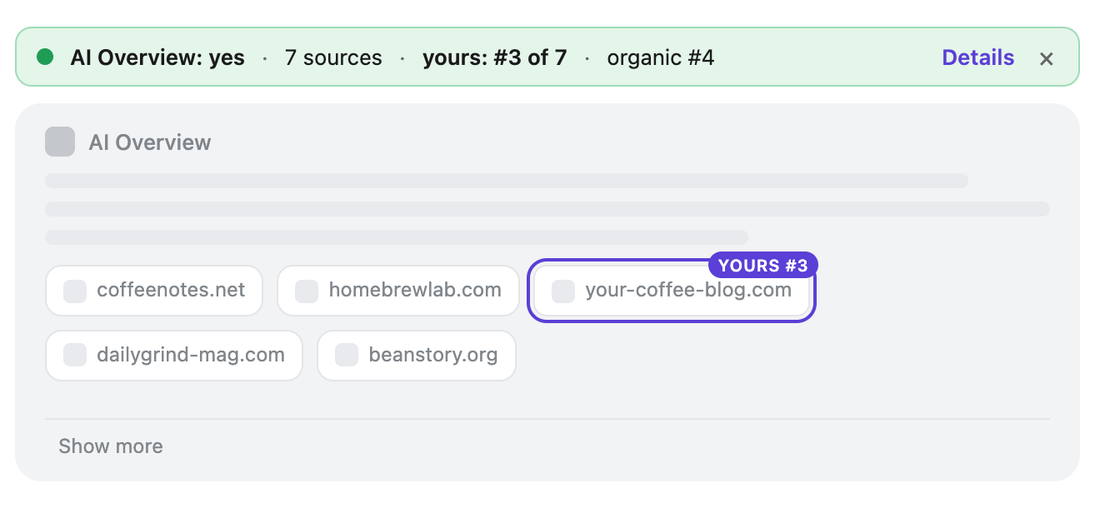
The picture shows a simplified results page with made-up sites.
How it works
- Add your domainOpen the extension, go to Settings and add your site, or up to 20 client domains.
- Search on GoogleOpen any results page the way you always do. Nothing runs in the background.
- Read the barGreen: you are cited. Blue: the block is there without you. Grey: no AI Overview. Details lists every cited source.
What this ai overview checker shows
The extension reads the AI Overview block on the page you opened and lists the sites it cites, in order, with your own domains on top. Sources hidden behind Show more are marked, so you know when to expand the block. Your domains are outlined inside the block and in the ordinary results, which makes a case like organic #4, not cited, easy to spot.
Every new results page goes into a local history of the last 500 checks: date, search phrase, country and language, whether there was an AI Overview, how many sources and your position. Download it as a CSV file for a client report, or clear it whenever you like.
What it does not do
It does not send your searches or domains anywhere: there is no account and no server, and the extension makes no network requests. It does not run searches by itself and does not check lists of keywords. It does not hide or change the AI Overview, and it does not read the separate AI Mode page. Results depend on your country, language and Google account, so the extension reads exactly the page in front of you.
Questions
Does the extension send my searches anywhere?
No. It reads the Google results page you open inside your browser. Your search phrases, your domains and the history of checks stay in Chrome's local storage on your computer.
Can it check a list of keywords?
No. It reads one results page at a time, the one you open. It never runs searches on its own.
Why can the results differ from what a colleague sees?
Google shows different results by country, language, account and search history. The extension reads exactly the page in front of you and saves the country and language of each check.
How the extension and this website handle data: privacy policy.